
Entity Searcher
This guide will walk you through how to use the Entity Searcher to search for entities in your product catalogue.
The Entity Searcher is a powerful tool in the Deducto Dashboard that allows you to easily search and select entities (like products, categories, or brands) when creating or editing promotions. Instead of manually entering IDs or names, you can use this interactive search interface to find and select the exact items you want to include in your promotion logic.
Where is it used?
If you have set up your Deducto project with the full Shopify integration (WooCommerce coming soon), or if you have set up a search integration with Algolia or Typesense, you can use the Entity Searcher whenever you need to work with IDs of products, categories, or other entities.
You can use the Entity Searcher whenever you need to select specific products, categories, or other entities for a promotion. This provides an alternative approach to defining promotion rules based on product attributes, where product eligibility for discounts is determined by attribute values that may change over time.
Example usage scenarios:
- Setting up item groups by selecting specific products to include
- Configuring trigger conditions that determine when promotions should apply
- Defining exclusion rules to specify which items should not receive discounts
Instead of manually entering product IDs or category IDs, the Entity Searcher provides an intuitive interface for finding items by searching their names, SKUs, and other attributes. You can also filter results using attributes like price range, category, brand, and more, as well as sort results by various fields like name or price.
This makes it much easier to precisely target the products you want to include in your promotional rules, especially when dealing with large product catalogues where manual ID entry would be time-consuming and error-prone.
For information on setting up integrations, please refer to the specific integration guide for your setup.
How it works
The Entity Searcher connects to your product data source based on your integration type:
- Shopify: Directly searches your store's product catalogue hosted on Shopify. WooCommerce support is coming soon.
- Algolia / Typesense: Searches your configured search indices/collections.
Configuring the Entity Searcher
With Shopify, the Entity Searcher is mostly pre-configured to work with the APIs provided by the platform. This means the number of attributes you can refine or sort by may be limited to what is available in the API.
For Algolia or Typesense integrations, you can configure how the Entity Searcher works by setting the following in the Search Index configurations you add to your Deducto project's configuration:
- Display Attributes: What information appears in the search results table
- Refinement Attributes: What filters are available to narrow down results
- Sort Options: How results can be ordered
For detailed setup instructions, refer to:
Using filters and sorting
Once configured, the Entity Searcher provides several ways to find what you're looking for.
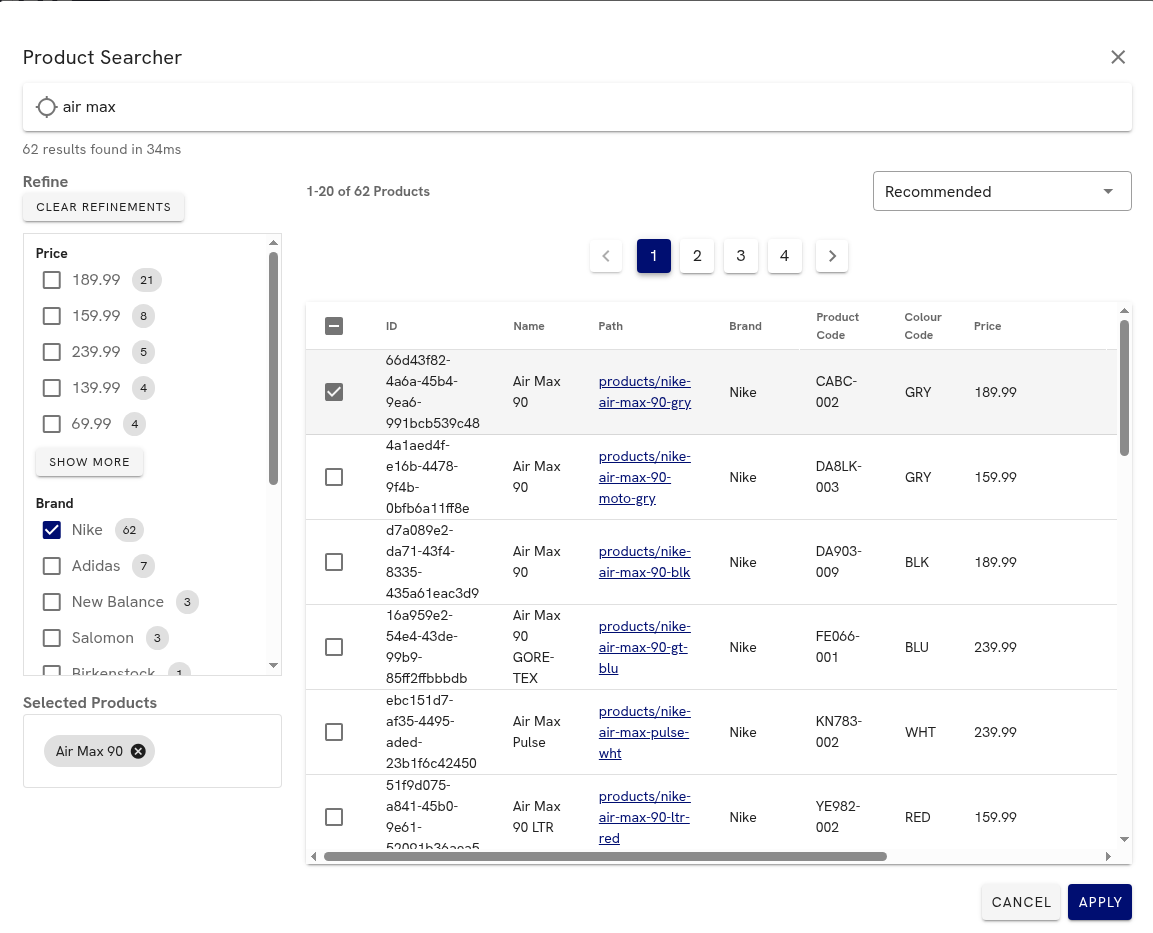
Example Entity Searcher view with refinements, search results, and a selected product ready to apply
-
Text Search: Type to search across configured attributes
-
Refinements: Use the filters panel to narrow results by:
- Brand / Vendor
- Price range
- Custom attributes (if configured)
-
Sorting: Order results by:
- Relevance (default)
- Price (high to low/low to high)
- Name
- Custom sort options (if configured)
The interface should feel familiar and works similarly to browsing products in your ecommerce platform's admin panel or filtering items while shopping online, where you can search and filter by attributes like price, brand, and category.
Updated 5 months ago